The AI agent orchestration development platform

All in one development platform that uses personal AI assistant to orchestrate the entire software building lifecycle

curl -fsSL https://cli.inspectorai.pro/install.sh | bash

Your requirements

Implement JWT-based authentication across backend and frontend.

02 / 145
Codex created 5 tasks across 2 projects
PR
Product Manager

@backdevBro work please

BA
backdev

@Codexdo task 1 Auth API endpoints in my project

Codex

Working. Gathering backend context and implementing auth endpoints.

Codex moved the backend auth task to Human Review just now.
Board
Codex moved from In Progress to Human Review · just now
In progress
1

Access-token validation

- Validate the access token from the `Authorization: Bearer` header

BAbackendFbackdev
Human review
1

Auth API endpoints

- Create auth api endpoints

- Validate user credentials

BAbackendFbackdev

Modern agentic product development

Full cycle from requirements to Pull Request

Inspector turns requirements into specifications, tasks, and code — unifying the entire development flow in a single, structured workflow

Agent orchestrator
Step 1🧑‍💻
RequirementsBug reportsUser feedback
Step 2
ResearchSpecificationsDocumentations
Step 3
TasksBreakdownsTasks specs
Step 4
ExecutionCodingTesting
Step 5🧑‍💻
Human reviewQuality insurance
Result🎉
Feature shippedProduct built!
Agent orchestrator
Step 1🧑‍💻
RequirementsBug reportsUser feedback
Step 2
ResearchSpecificationsDocumentations
Step 3
TasksBreakdownsTasks specs
Step 4
ExecutionCodingTesting
Step 5🧑‍💻
Human reviewQuality insurance
Result🎉
Feature shippedProduct built!

Personal claw orchestrator

AI-assistent that helps you manage all development stages from anywhere

Platform where teams and agents unite

A single piece of software for modern product development and team seamless collaboration

Sathyvs avatar
awsdataarchitect avatar
Profile avatar

Spec-driven tasks flow

Manage product development with spec-driven tasks kaban board and easily handoff tasks to agents or teammates
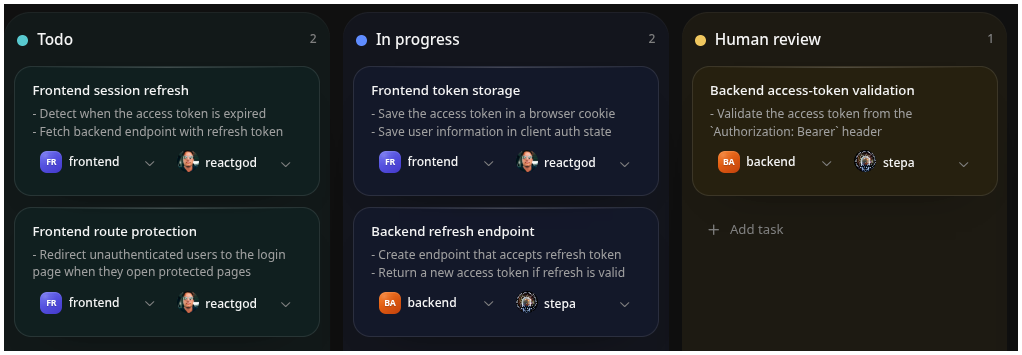
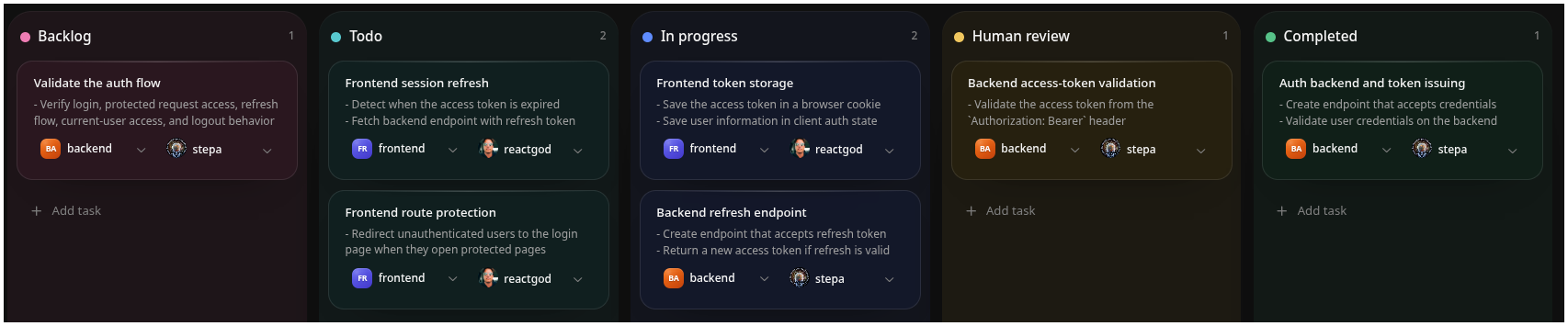
kanbanboardkanbanboard

FAQ

Find answers to common questions about Inspector and its capabilities.

How do I get started with Inspector?

Create an account, set up a workspace, and describe your first requirement in chat - Inspector will generate specs and tasks automatically.

What kinds of tasks can Inspector handle?

Inspector can generate technical specifications, break them into tasks, manage workflows, and assist with coding across multiple projects.

Is Inspector secure?

Yes, your data and code stay within your workspace. We follow modern security practices and do not use your data outside your environment.

Which models does Inspector use?

Inspector uses multiple AI models depending on your plan, from lightweight models to advanced reasoning models for complex tasks.

What are the system requirements to run Inspector?

Inspector runs in the browser and via CLI, so you can use it from any modern browser or a standard developer machine without specialized hardware.

How much does Inspector cost?

Inspector offers Free, Pro, Max, and Team plans. All features are included - pricing depends on AI usage and model access.

Does Inspector support team collaboration?

Yes, Inspector is built for team-oriented development with shared context, task management, and real-time collaboration.

Can I use Inspector on mobile or messaging apps?

Yes, you can interact with Inspector through chat and messaging apps to manage tasks and documentation from any location.

Where teams meet agents

No credit card required · Free tier available

© 2026 Inspector. All rights reserved.